Streamlining Content Creation with WordPress: Tips and Tools
Streamlining Content Creation with WordPress: Tips and Tools – Running a website today means producing content consistently. Whether it’s for a blog, niche site, or a private blog network (PBN), content is the engine that keeps everything moving. However, creating articles regularly can quickly become time-consuming if the workflow is not organized.
This is where WordPress becomes incredibly helpful. As one of the most widely used content management systems in the world, it offers flexibility, automation, and tools that make the entire content creation process smoother. When used properly, WordPress can help website owners publish faster, manage multiple posts easily, and keep content optimized for search engines.
In this article, we’ll explore how to streamline content creation with WordPress, especially for SEO-focused sites such as PBNs, while keeping the workflow efficient and sustainable.
Why WordPress Is Ideal for Content Production
WordPress is designed to make publishing simple. Even beginners can create and publish articles without technical knowledge. But beyond the basic editor, WordPress also provides powerful features that support content production at scale.
For PBN owners or SEO practitioners managing several websites, the ability to quickly draft, edit, schedule, and publish content is extremely valuable. WordPress allows you to centralize the writing process, organize posts with categories and tags, and maintain consistent formatting across your entire site.
Another reason WordPress stands out is its massive ecosystem of plugins and themes. These tools allow users to automate repetitive tasks, improve on-page SEO, and manage content more efficiently. Instead of doing everything manually, many steps in the publishing process can be simplified with the right setup.
When these tools are used correctly, content creation becomes less stressful and far more structured.
Building an Efficient Content Workflow
One of the most overlooked aspects of content creation is workflow. Many website owners jump straight into writing without a clear structure, which often leads to slower publishing and inconsistent quality.
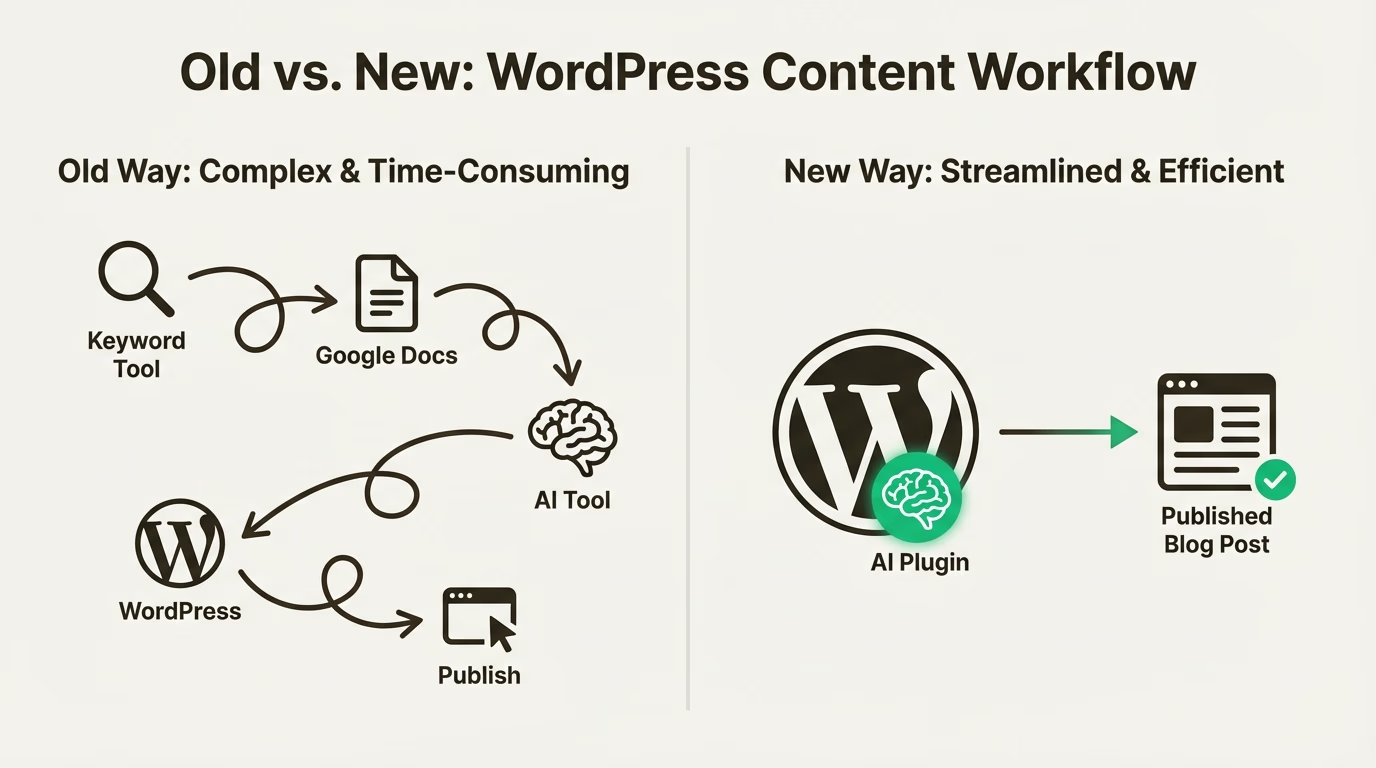
A better approach is to create a repeatable process for every article. Start with keyword research and define the main topic before writing. Once the target keyword is clear, outline the article structure with a few logical headings. This step alone can dramatically reduce writing time because the direction of the article is already defined.
In WordPress, drafts can be created and saved immediately, allowing writers to build content gradually without worrying about losing progress. The built-in editor also makes it easy to adjust headings, add links, and maintain consistent formatting.
For PBN websites, maintaining a natural flow of content is important. Publishing articles on a regular schedule helps the site appear more active and authentic. WordPress scheduling features make this simple by allowing posts to be prepared in advance and published automatically at specific times.
This approach saves time while keeping the website updated without daily manual work.
Essential Tools That Simplify Content Creation
Although WordPress works well on its own, a few carefully selected tools can make the content creation process significantly faster.
One of the most useful categories is SEO plugins. These tools help optimize articles while you write by analyzing keyword usage, readability, and basic on-page elements. They also help manage meta titles, descriptions, and indexing preferences, which are important for search visibility.
Another helpful tool is an editorial calendar plugin. When managing multiple posts or websites, it becomes difficult to track what has already been published and what still needs to be written. An editorial calendar provides a visual overview of scheduled content and helps maintain a consistent publishing rhythm.
Content formatting tools can also save time. Instead of manually adjusting every heading, paragraph, or spacing style, preconfigured templates allow writers to maintain a consistent structure across posts. This is particularly helpful for PBN sites where efficiency is a priority.
Media management tools are another small but useful addition. Images, thumbnails, and media files can be organized more effectively, making it easier to locate and reuse assets across different articles.
The goal is not to install dozens of plugins but to select a few that genuinely improve workflow.
Writing SEO-Friendly Content Inside WordPress
Streamlining content creation should never come at the expense of quality. Search engines still prioritize helpful, readable, and relevant content.
A good starting point is writing naturally while keeping the main keyword present in strategic locations. Titles, headings, and the opening paragraph are common areas where keywords should appear. However, the overall readability of the article should always come first.
WordPress makes formatting simple, which helps improve user experience. Clear headings, short paragraphs, and logical sections make articles easier to read. This structure also helps search engines better understand the content.
Internal linking is another important aspect of SEO that can be handled directly within the WordPress editor. By linking to other relevant articles on the same site, you create stronger content connections and distribute authority throughout the website.
For PBN sites, internal linking also helps reinforce topical relevance while making the site look more natural from a structural standpoint.
Images can also support SEO when used correctly. Adding descriptive file names and alt text helps search engines understand what the image represents while improving accessibility.
These small optimizations collectively strengthen the overall SEO performance of each article.
Managing Multiple Sites Without Overwhelm
One of the biggest challenges for PBN owners is managing several websites simultaneously. Without a structured system, content production can quickly become chaotic.
WordPress helps reduce this complexity by providing a familiar interface across all installations. Once you understand the dashboard and publishing tools, the same process can be repeated on every site.
Many users also rely on content batching. Instead of writing one article per day, several posts are prepared in a single session and scheduled for future publication. This approach reduces daily workload and keeps content output consistent.
Another helpful practice is maintaining a list of content ideas and keywords for each site. When it’s time to write, you already have a clear topic to work on instead of starting from scratch.
Consistency is key when managing multiple websites, and WordPress provides the structure needed to maintain that consistency.
Keeping Content Natural for Long-Term SEO
For PBN websites, maintaining a natural appearance is essential. This means avoiding overly aggressive optimization and focusing on content that reads smoothly.
Articles should feel like normal blog posts rather than obvious SEO pieces. Varying article length, writing style, and topic depth can help create a more organic content profile.
WordPress supports this approach by making it easy to diversify content types. Some posts can be informational guides, while others may be short opinion pieces, updates, or niche insights.
Over time, this variety helps the website look more like a genuine blog rather than a purely technical asset.
Maintaining quality content also ensures that the site continues to hold value in the long run.
Conclusion
Streamlining content creation with WordPress is less about shortcuts and more about building an efficient system. With the right workflow, tools, and publishing strategy, producing content becomes far easier and more sustainable.
WordPress offers the flexibility needed to organize drafts, optimize articles, schedule posts, and manage multiple websites without unnecessary complexity. For PBN owners and SEO professionals, this efficiency can make a significant difference in long-term productivity.