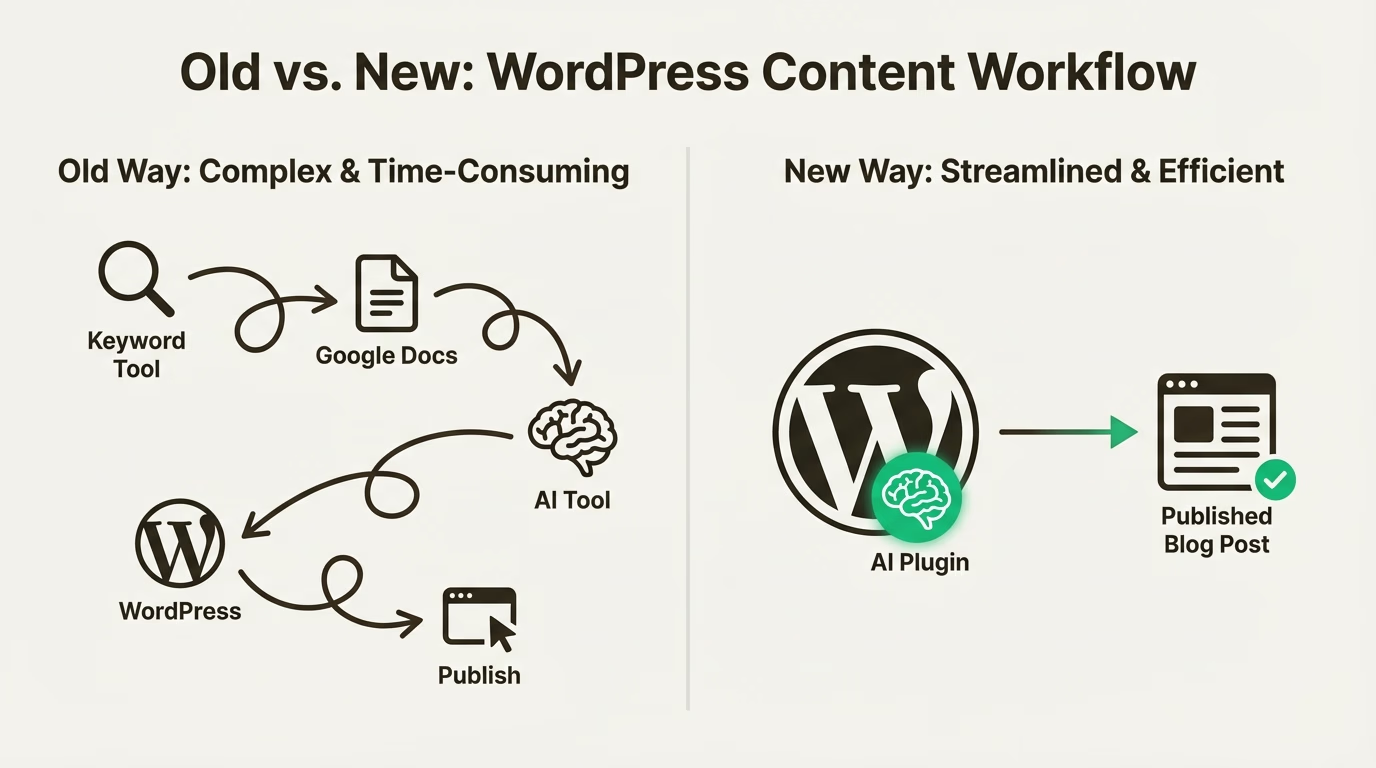
Streamlining Content Creation with WordPress: Tips and Tools
Streamlining Content Creation with WordPress: Tips and Tools – Running a website today means producing content consistently. Whether it’s for a blog, niche site, or a private blog network (PBN), content is the engine that keeps everything moving. However, creating articles regularly can quickly become time-consuming if the workflow is not organized.
This is where WordPress becomes incredibly helpful. As one of the most widely used content management systems in the world, it offers flexibility, automation, and tools that make the entire content creation process smoother. When used properly, WordPress can help website owners publish faster, manage multiple posts easily, and keep content optimized for search engines.
In this article, we’ll explore how to streamline content creation with WordPress, especially for SEO-focused sites such as PBNs, while keeping the workflow efficient and sustainable.
Why WordPress Is Ideal for Content Production
WordPress is designed to make publishing simple. Even beginners can create and publish articles without technical knowledge. But beyond the basic editor, WordPress also provides powerful features that support content production at scale.
For PBN owners or SEO practitioners managing several websites, the ability to quickly draft, edit, schedule, and publish content is extremely valuable. WordPress allows you to centralize the writing process, organize posts with categories and tags, and maintain consistent formatting across your entire site.
Another reason WordPress stands out is its massive ecosystem of plugins and themes. These tools allow users to automate repetitive tasks, improve on-page SEO, and manage content more efficiently. Instead of doing everything manually, many steps in the publishing process can be simplified with the right setup.
When these tools are used correctly, content creation becomes less stressful and far more structured.
Building an Efficient Content Workflow
One of the most overlooked aspects of content creation is workflow. Many website owners jump straight into writing without a clear structure, which often leads to slower publishing and inconsistent quality.
A better approach is to create a repeatable process for every article. Start with keyword research and define the main topic before writing. Once the target keyword is clear, outline the article structure with a few logical headings. This step alone can dramatically reduce writing time because the direction of the article is already defined.
In WordPress, drafts can be created and saved immediately, allowing writers to build content gradually without worrying about losing progress. The built-in editor also makes it easy to adjust headings, add links, and maintain consistent formatting.
For PBN websites, maintaining a natural flow of content is important. Publishing articles on a regular schedule helps the site appear more active and authentic. WordPress scheduling features make this simple by allowing posts to be prepared in advance and published automatically at specific times.
This approach saves time while keeping the website updated without daily manual work.
Essential Tools That Simplify Content Creation
Although WordPress works well on its own, a few carefully selected tools can make the content creation process significantly faster.
One of the most useful categories is SEO plugins. These tools help optimize articles while you write by analyzing keyword usage, readability, and basic on-page elements. They also help manage meta titles, descriptions, and indexing preferences, which are important for search visibility.
Another helpful tool is an editorial calendar plugin. When managing multiple posts or websites, it becomes difficult to track what has already been published and what still needs to be written. An editorial calendar provides a visual overview of scheduled content and helps maintain a consistent publishing rhythm.
Content formatting tools can also save time. Instead of manually adjusting every heading, paragraph, or spacing style, preconfigured templates allow writers to maintain a consistent structure across posts. This is particularly helpful for PBN sites where efficiency is a priority.
Media management tools are another small but useful addition. Images, thumbnails, and media files can be organized more effectively, making it easier to locate and reuse assets across different articles.
The goal is not to install dozens of plugins but to select a few that genuinely improve workflow.
Writing SEO-Friendly Content Inside WordPress
Streamlining content creation should never come at the expense of quality. Search engines still prioritize helpful, readable, and relevant content.
A good starting point is writing naturally while keeping the main keyword present in strategic locations. Titles, headings, and the opening paragraph are common areas where keywords should appear. However, the overall readability of the article should always come first.
WordPress makes formatting simple, which helps improve user experience. Clear headings, short paragraphs, and logical sections make articles easier to read. This structure also helps search engines better understand the content.
Internal linking is another important aspect of SEO that can be handled directly within the WordPress editor. By linking to other relevant articles on the same site, you create stronger content connections and distribute authority throughout the website.
For PBN sites, internal linking also helps reinforce topical relevance while making the site look more natural from a structural standpoint.
Images can also support SEO when used correctly. Adding descriptive file names and alt text helps search engines understand what the image represents while improving accessibility.
These small optimizations collectively strengthen the overall SEO performance of each article.
Managing Multiple Sites Without Overwhelm
One of the biggest challenges for PBN owners is managing several websites simultaneously. Without a structured system, content production can quickly become chaotic.
WordPress helps reduce this complexity by providing a familiar interface across all installations. Once you understand the dashboard and publishing tools, the same process can be repeated on every site.
Many users also rely on content batching. Instead of writing one article per day, several posts are prepared in a single session and scheduled for future publication. This approach reduces daily workload and keeps content output consistent.
Another helpful practice is maintaining a list of content ideas and keywords for each site. When it’s time to write, you already have a clear topic to work on instead of starting from scratch.
Consistency is key when managing multiple websites, and WordPress provides the structure needed to maintain that consistency.
Keeping Content Natural for Long-Term SEO
For PBN websites, maintaining a natural appearance is essential. This means avoiding overly aggressive optimization and focusing on content that reads smoothly.
Articles should feel like normal blog posts rather than obvious SEO pieces. Varying article length, writing style, and topic depth can help create a more organic content profile.
WordPress supports this approach by making it easy to diversify content types. Some posts can be informational guides, while others may be short opinion pieces, updates, or niche insights.
Over time, this variety helps the website look more like a genuine blog rather than a purely technical asset.
Maintaining quality content also ensures that the site continues to hold value in the long run.
Conclusion
Streamlining content creation with WordPress is less about shortcuts and more about building an efficient system. With the right workflow, tools, and publishing strategy, producing content becomes far easier and more sustainable.
WordPress offers the flexibility needed to organize drafts, optimize articles, schedule posts, and manage multiple websites without unnecessary complexity. For PBN owners and SEO professionals, this efficiency can make a significant difference in long-term productivity.

Smart Digital Solutions Built with WordPress
Smart Digital Solutions Built with WordPress – In today’s fast-moving digital world, businesses need more than just an online presence. They need smart digital solutions that actually work, scale, and support long-term growth. This is where WordPress continues to stand out as one of the most reliable and flexible platforms for building modern digital solutions.
WordPress is no longer just a blogging tool. It has evolved into a powerful ecosystem capable of supporting business websites, corporate profiles, e-commerce stores, landing pages, and even complex web applications. When used correctly, WordPress becomes the foundation for smart digital solutions that are both efficient and future-ready.
Why WordPress Remains a Smart Choice
One of the main reasons WordPress dominates the digital space is flexibility. Businesses from startups to established brands can customize WordPress to fit their exact needs. Whether the goal is brand awareness, lead generation, or online sales, WordPress offers the tools to support it.
Another advantage is cost efficiency. Compared to custom-built platforms, WordPress allows businesses to launch faster with lower development costs while still maintaining professional quality. This makes it a smart digital solution for companies that want high performance without unnecessary complexity.
Security and scalability also play a major role. With proper configuration, regular updates, and trusted plugins, WordPress can handle growing traffic and evolving business requirements smoothly.
Building Smart Digital Solutions with WordPress
Smart digital solutions are not just about design. They focus on strategy, user experience, performance, and long-term usability. WordPress supports all of these elements when developed with the right approach.
Custom Design and User Experience
A smart WordPress solution starts with user-focused design. Custom themes allow businesses to build interfaces that align with their brand identity while remaining intuitive for visitors. A clean layout, clear navigation, and fast-loading pages help users stay longer and engage more.
WordPress supports responsive design by default, ensuring that websites look and function well on desktops, tablets, and mobile devices. This is essential in a digital environment where mobile traffic continues to grow.
Performance and Speed Optimization
Speed is a critical factor in modern digital solutions. WordPress offers multiple ways to optimize performance, including caching systems, image optimization, and lightweight themes. A well-optimized WordPress site improves user experience and also supports better search engine visibility.
Smart digital solutions built with WordPress focus on performance from the beginning, not as an afterthought. This includes clean code, reliable hosting, and minimal unnecessary plugins.
SEO-Friendly Architecture
One of WordPress’s strongest advantages is its SEO-friendly structure. Clean URLs, easy content management, and customizable metadata make it easier for search engines to understand and index websites.
With proper on-page optimization, WordPress becomes a strong foundation for organic growth. This is especially important for businesses relying on content marketing, long-term visibility, and authority building across multiple platforms.
WordPress for Business and Growth
Smart digital solutions should support business goals, not limit them. WordPress excels in this area by offering scalability and integration with various digital tools.
Integration with Digital Tools
WordPress integrates seamlessly with CRM systems, email marketing platforms, analytics tools, and payment gateways. This allows businesses to automate processes, track user behavior, and make data-driven decisions.
From contact forms to advanced marketing funnels, WordPress acts as a central hub for digital operations. This level of integration helps businesses operate smarter, not harder.
E-Commerce and Monetization
For businesses focused on online sales, WordPress offers powerful e-commerce capabilities through well-established solutions. Online stores built with WordPress can manage products, payments, and customer data efficiently while remaining flexible for future expansion.
Smart monetization strategies, such as subscriptions, digital products, or service-based offerings, can all be implemented within the WordPress ecosystem.
Content-Driven Digital Strategies
Content remains a key element of any smart digital solution. WordPress was built with content management at its core, making it ideal for businesses that rely on consistent publishing.
From blog articles to landing pages and case studies, WordPress allows teams to manage content easily without technical barriers. This encourages regular updates, which support both user engagement and search engine visibility.
A well-structured content strategy combined with WordPress creates long-term digital assets that continue to deliver value over time.
Security and Long-Term Reliability
Smart digital solutions must be secure and reliable. WordPress offers strong security foundations when maintained properly. Regular updates, trusted plugins, and secure hosting environments help protect websites from common threats.
Businesses that treat WordPress as a long-term platform benefit from its active global community. Continuous development and innovation ensure that WordPress remains relevant and adaptable to future digital trends.
Conclusion
Smart digital solutions built with WordPress combine flexibility, performance, and strategic value. When developed with the right mindset, WordPress becomes more than a website platform. It becomes a digital foundation that supports growth, engagement, and long-term success.
For businesses looking for a reliable, scalable, and cost-effective solution, WordPress continues to prove that smart digital solutions do not need to be complicated. They just need to be built right.