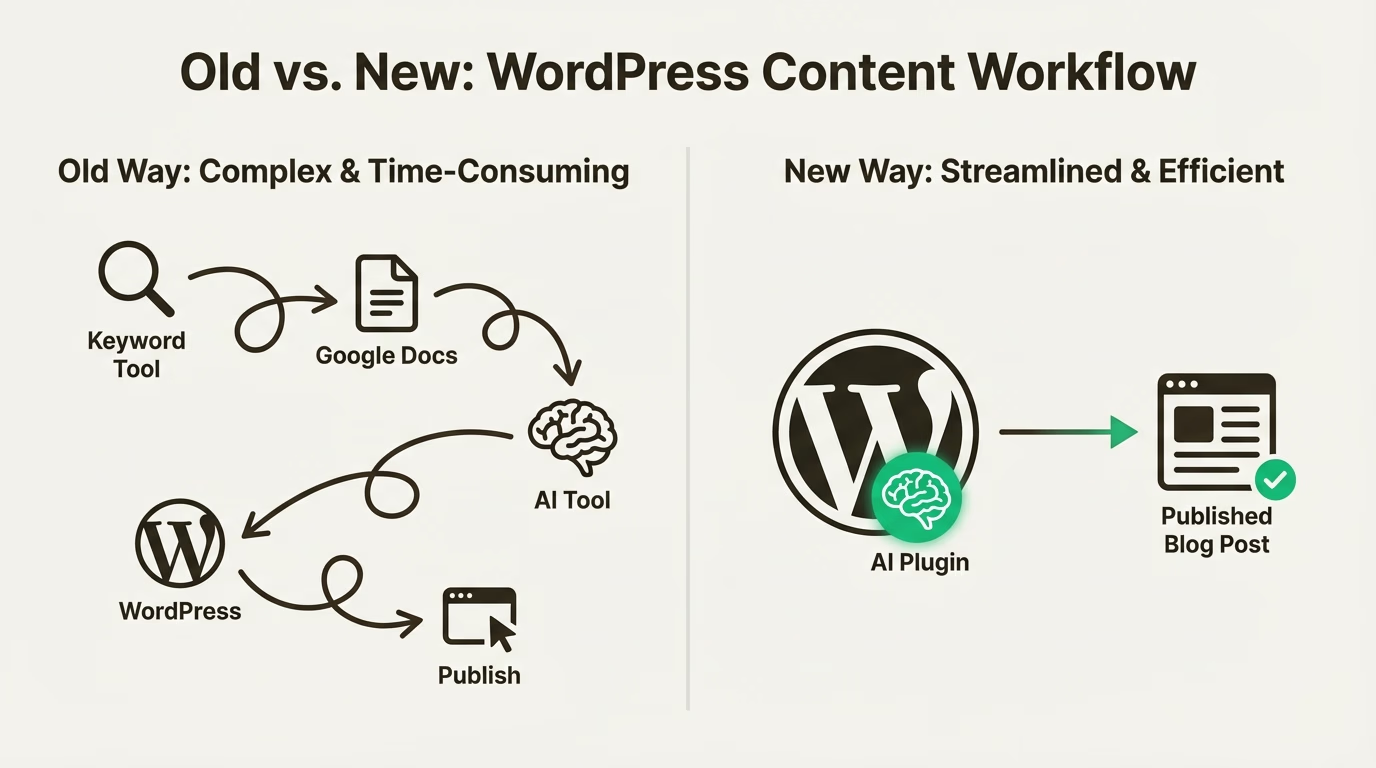
Streamlining Content Creation with WordPress: Tips and Tools
Streamlining Content Creation with WordPress: Tips and Tools – Running a website today means producing content consistently. Whether it’s for a blog, niche site, or a private blog network (PBN), content is the engine that keeps everything moving. However, creating articles regularly can quickly become time-consuming if the workflow is not organized.
This is where WordPress becomes incredibly helpful. As one of the most widely used content management systems in the world, it offers flexibility, automation, and tools that make the entire content creation process smoother. When used properly, WordPress can help website owners publish faster, manage multiple posts easily, and keep content optimized for search engines.
In this article, we’ll explore how to streamline content creation with WordPress, especially for SEO-focused sites such as PBNs, while keeping the workflow efficient and sustainable.
Why WordPress Is Ideal for Content Production
WordPress is designed to make publishing simple. Even beginners can create and publish articles without technical knowledge. But beyond the basic editor, WordPress also provides powerful features that support content production at scale.
For PBN owners or SEO practitioners managing several websites, the ability to quickly draft, edit, schedule, and publish content is extremely valuable. WordPress allows you to centralize the writing process, organize posts with categories and tags, and maintain consistent formatting across your entire site.
Another reason WordPress stands out is its massive ecosystem of plugins and themes. These tools allow users to automate repetitive tasks, improve on-page SEO, and manage content more efficiently. Instead of doing everything manually, many steps in the publishing process can be simplified with the right setup.
When these tools are used correctly, content creation becomes less stressful and far more structured.
Building an Efficient Content Workflow
One of the most overlooked aspects of content creation is workflow. Many website owners jump straight into writing without a clear structure, which often leads to slower publishing and inconsistent quality.
A better approach is to create a repeatable process for every article. Start with keyword research and define the main topic before writing. Once the target keyword is clear, outline the article structure with a few logical headings. This step alone can dramatically reduce writing time because the direction of the article is already defined.
In WordPress, drafts can be created and saved immediately, allowing writers to build content gradually without worrying about losing progress. The built-in editor also makes it easy to adjust headings, add links, and maintain consistent formatting.
For PBN websites, maintaining a natural flow of content is important. Publishing articles on a regular schedule helps the site appear more active and authentic. WordPress scheduling features make this simple by allowing posts to be prepared in advance and published automatically at specific times.
This approach saves time while keeping the website updated without daily manual work.
Essential Tools That Simplify Content Creation
Although WordPress works well on its own, a few carefully selected tools can make the content creation process significantly faster.
One of the most useful categories is SEO plugins. These tools help optimize articles while you write by analyzing keyword usage, readability, and basic on-page elements. They also help manage meta titles, descriptions, and indexing preferences, which are important for search visibility.
Another helpful tool is an editorial calendar plugin. When managing multiple posts or websites, it becomes difficult to track what has already been published and what still needs to be written. An editorial calendar provides a visual overview of scheduled content and helps maintain a consistent publishing rhythm.
Content formatting tools can also save time. Instead of manually adjusting every heading, paragraph, or spacing style, preconfigured templates allow writers to maintain a consistent structure across posts. This is particularly helpful for PBN sites where efficiency is a priority.
Media management tools are another small but useful addition. Images, thumbnails, and media files can be organized more effectively, making it easier to locate and reuse assets across different articles.
The goal is not to install dozens of plugins but to select a few that genuinely improve workflow.
Writing SEO-Friendly Content Inside WordPress
Streamlining content creation should never come at the expense of quality. Search engines still prioritize helpful, readable, and relevant content.
A good starting point is writing naturally while keeping the main keyword present in strategic locations. Titles, headings, and the opening paragraph are common areas where keywords should appear. However, the overall readability of the article should always come first.
WordPress makes formatting simple, which helps improve user experience. Clear headings, short paragraphs, and logical sections make articles easier to read. This structure also helps search engines better understand the content.
Internal linking is another important aspect of SEO that can be handled directly within the WordPress editor. By linking to other relevant articles on the same site, you create stronger content connections and distribute authority throughout the website.
For PBN sites, internal linking also helps reinforce topical relevance while making the site look more natural from a structural standpoint.
Images can also support SEO when used correctly. Adding descriptive file names and alt text helps search engines understand what the image represents while improving accessibility.
These small optimizations collectively strengthen the overall SEO performance of each article.
Managing Multiple Sites Without Overwhelm
One of the biggest challenges for PBN owners is managing several websites simultaneously. Without a structured system, content production can quickly become chaotic.
WordPress helps reduce this complexity by providing a familiar interface across all installations. Once you understand the dashboard and publishing tools, the same process can be repeated on every site.
Many users also rely on content batching. Instead of writing one article per day, several posts are prepared in a single session and scheduled for future publication. This approach reduces daily workload and keeps content output consistent.
Another helpful practice is maintaining a list of content ideas and keywords for each site. When it’s time to write, you already have a clear topic to work on instead of starting from scratch.
Consistency is key when managing multiple websites, and WordPress provides the structure needed to maintain that consistency.
Keeping Content Natural for Long-Term SEO
For PBN websites, maintaining a natural appearance is essential. This means avoiding overly aggressive optimization and focusing on content that reads smoothly.
Articles should feel like normal blog posts rather than obvious SEO pieces. Varying article length, writing style, and topic depth can help create a more organic content profile.
WordPress supports this approach by making it easy to diversify content types. Some posts can be informational guides, while others may be short opinion pieces, updates, or niche insights.
Over time, this variety helps the website look more like a genuine blog rather than a purely technical asset.
Maintaining quality content also ensures that the site continues to hold value in the long run.
Conclusion
Streamlining content creation with WordPress is less about shortcuts and more about building an efficient system. With the right workflow, tools, and publishing strategy, producing content becomes far easier and more sustainable.
WordPress offers the flexibility needed to organize drafts, optimize articles, schedule posts, and manage multiple websites without unnecessary complexity. For PBN owners and SEO professionals, this efficiency can make a significant difference in long-term productivity.

WordPress Solutions for Small Businesses
WordPress Solutions for Small Businesses – In today’s digital landscape, having a strong online presence is no longer optional for small businesses. Customers expect to find information quickly, browse products easily, and trust a brand before making a purchase. This is where WordPress solutions for small businesses play a crucial role. As one of the most popular content management systems in the world, WordPress offers flexibility, affordability, and scalability that perfectly match the needs of growing businesses.
Unlike complex enterprise platforms, WordPress allows small business owners to build and manage professional websites without requiring deep technical knowledge. From local service providers to online shops, WordPress adapts to different business models and marketing goals with ease.
Why WordPress Is Ideal for Small Businesses
One of the main reasons WordPress is widely used by small businesses is its accessibility. The platform is designed to be user-friendly, allowing business owners to update content, publish blog posts, and manage pages without relying heavily on developers. This level of control saves time and reduces long-term costs.
Another advantage is its open-source nature. WordPress itself is free, and business owners can choose hosting, themes, and plugins based on their budget. This flexibility makes it possible to start small and expand later as the business grows.
WordPress also has a massive ecosystem. Thousands of developers continuously create themes and plugins that enhance functionality, from contact forms and booking systems to advanced analytics and security tools. This ecosystem ensures that small businesses can find solutions tailored to their specific needs.
Custom Website Design with WordPress
A professional-looking website builds trust. WordPress offers countless customization options that allow small businesses to create a unique brand identity online. With the right theme and design approach, a WordPress website can look just as polished as a custom-built site, without the high development cost.
Branding and User Experience
WordPress themes can be customized to match brand colors, typography, and messaging. This consistency helps strengthen brand recognition and creates a better user experience. A clean layout, intuitive navigation, and fast loading times encourage visitors to stay longer and engage with the business.
Mobile-Friendly Solutions
Most modern WordPress themes are responsive, meaning the website automatically adapts to different screen sizes. Since a large portion of users browse websites on mobile devices, this is essential for reaching and retaining customers. A mobile-friendly WordPress site also contributes positively to search engine rankings.
SEO Advantages of WordPress for Small Businesses
Search engine optimization is one of the strongest reasons small businesses choose WordPress. The platform is built with clean code and structure, making it easier for search engines to crawl and index content.
WordPress allows full control over on-page SEO elements such as URLs, meta titles, meta descriptions, and headings. This control is especially valuable for businesses targeting local or niche keywords. With the right optimization strategy, a WordPress website can compete effectively in search results, even against larger competitors.
Content creation is another SEO benefit. WordPress makes it simple to publish blog posts, service pages, and landing pages regularly. Fresh, relevant content signals search engines that the website is active and valuable, helping improve rankings over time.
WordPress Plugins That Support Business Growth
Plugins are one of WordPress’s strongest features. They allow small businesses to add advanced functionality without custom development.
Marketing and Lead Generation
With WordPress, businesses can integrate email marketing tools, contact forms, and CRM systems directly into their websites. This makes it easier to capture leads and follow up with potential customers. Automation features help small teams work more efficiently while maintaining a professional marketing approach.
E-commerce Solutions
WordPress is also a powerful platform for online sales. With the right setup, small businesses can sell physical products, digital downloads, or services directly from their website. Payment gateways, inventory management, and order tracking can all be handled within the WordPress ecosystem.
Security and Performance
Security is a major concern for any business website. WordPress offers various solutions to protect data and prevent unauthorized access. Regular updates and performance optimization tools help keep the site running smoothly and safely, which is essential for maintaining customer trust.
Cost-Effective Website Management
Budget is often a limiting factor for small businesses. WordPress stands out because it offers professional-level results at a relatively low cost. Hosting plans are affordable, and many high-quality themes and plugins are available at reasonable prices or even free.
Maintenance is also manageable. Routine updates, backups, and content changes can often be handled without hiring a full-time developer. This allows small businesses to allocate resources to other important areas like marketing or customer service.
Scalability for Growing Businesses
One common concern among small business owners is whether their website can grow with their company. WordPress is highly scalable, meaning it can handle increased traffic, additional content, and expanded functionality over time.
As the business grows, new features can be added without rebuilding the entire website. This makes WordPress a long-term solution rather than a temporary fix. Whether expanding to new locations, adding services, or launching new products, WordPress adapts smoothly.
Choosing the Right WordPress Solution
While WordPress itself is powerful, success depends on choosing the right setup. This includes selecting reliable hosting, a well-coded theme, and essential plugins that align with business goals. A thoughtful approach ensures that the website remains fast, secure, and optimized for both users and search engines.
Working with experienced WordPress professionals can also be beneficial, especially during the initial setup. Proper planning and structure lay the foundation for long-term online success.
Final Thoughts on WordPress Solutions for Small Businesses
WordPress solutions for small businesses offer an ideal balance between functionality, affordability, and flexibility. The platform empowers business owners to take control of their online presence while providing the tools needed to compete in a crowded digital market.
With strong SEO capabilities, customizable design options, and endless scalability, WordPress continues to be a smart choice for small businesses looking to build a sustainable online presence. When implemented correctly, it becomes more than just a website platform—it becomes a growth engine that supports business goals today and in the future.

WordPress Digital Solutions for Growing Online Brands
WordPress Solutions That Power Fast Secure Sites
WordPress Solutions That Power Fast Secure Sites – When it comes to building a strong online presence, speed and security are no longer optional. They are essential. Whether you run a blog, a business website, or a network of PBN sites, your WordPress setup needs to be fast, reliable, and secure. The good news is that with the right tools and setup, WordPress can be one of the best platforms for building powerful websites that perform well in search engines.
In this article, we’ll explore the best WordPress solutions that help you build fast and secure sites, especially for PBN usage. These solutions focus on performance, safety, and SEO.
Why Speed and Security Matter for PBN Sites
PBN sites often get overlooked when it comes to performance. But a slow site can hurt your rankings, reduce user trust, and increase bounce rates. Search engines like Google prefer websites that load quickly and provide a good user experience.
Security is also critical. PBN sites are more vulnerable because they often receive less maintenance and attention than primary sites. A single hacked site can damage your entire network and make your SEO efforts useless. That’s why you need a solid security plan and reliable hosting.
Fast WordPress Hosting for Better Performance
The first step to building a fast WordPress site is choosing the right hosting. Cheap shared hosting might seem tempting, but it can slow down your site and create security risks. For PBN sites, it’s better to use hosting that offers speed, stability, and better control.
Choose Hosting with Strong Performance Features
- Look for hosting providers that offer:
- SSD storage for faster load times
- Server-level caching to reduce page load
- HTTP/2 support for better speed
- Reliable uptime and fast response times
- These features help your site load faster and keep visitors engaged.
- Use Lightweight WordPress Themes
Themes can make or break your website speed. Some themes look great but come with heavy code, slow loading, and bloated features that you never use. For PBN sites, it’s best to use lightweight themes that focus on speed and simplicity.
Recommended Theme Types for PBN Sites
A clean, minimalist theme that loads fast is always the best choice. Look for themes that are:
- Fast and lightweight
- SEO friendly
- Compatible with major plugins
- Clean and easy to customize
- This keeps your site quick and ensures it looks professional.
- Essential Plugins That Improve Speed and Security
Plugins are useful, but too many can slow down your site. For PBN sites, you want to keep your plugin list short and powerful. Here are some essential plugins that help improve speed and security without causing bloat.
Cache Plugin for Faster Load Times
A caching plugin reduces server load and improves page speed. It stores a static version of your pages so visitors can access them quickly.
A good caching setup helps your site load faster and improves SEO performance.
Security Plugin for Protection
Security plugins help prevent hacks, malware, and unwanted access. They can block suspicious activity, monitor login attempts, and protect your site from common threats.
For PBN sites, security plugins are a must because they reduce the risk of getting hacked and losing your site’s credibility.
Image Optimization for Faster Pages
Images are often the biggest reason sites load slowly. If your site has large images, it will take longer to load, especially on mobile devices.
Compress Images Without Losing Quality
Use image optimization tools that compress images without losing quality. This helps your pages load faster and improves user experience. It also helps your SEO because search engines prefer fast-loading sites.
Use Proper Image Sizes
Avoid uploading huge images and letting WordPress resize them automatically. Instead, resize images to the correct dimensions before uploading.
Use CDN for Global Speed
A Content Delivery Network (CDN) helps deliver your website content faster to users around the world. A CDN stores your website files on multiple servers across different regions, so visitors can load your site from the nearest server.
For PBN sites that may receive traffic from different countries, a CDN is a great way to improve speed and reduce server load.
Secure WordPress Setup for PBN Sites
Security starts with the basics. For PBN sites, a strong security setup can save you from future problems. Here are the most important steps to secure your WordPress site.
Strong Login Protection
Use strong passwords and limit login attempts. This prevents hackers from guessing your password and gaining access.
Keep WordPress Updated
Always keep WordPress core, themes, and plugins updated. Updates often include security patches that fix vulnerabilities.
Use HTTPS for Better Trust
SSL certificates help secure your website and protect user data. HTTPS also improves SEO because search engines favor secure websites.
Regular Backups for Peace of Mind
Backups are the most important safety net for any website. If your site gets hacked or crashes, a backup lets you restore everything quickly.
For PBN sites, regular backups ensure your network remains stable and safe. You can schedule automatic backups and store them on a remote server or cloud storage.
Final Thoughts
Building fast and secure WordPress sites is not difficult, but it does require the right approach. For PBN sites, performance and security should always be your top priorities. By choosing the right hosting, using lightweight themes, optimizing images, and securing your site properly, you can create a powerful WordPress network that supports your SEO goals.
If you focus on speed and security, your PBN will become more stable, reliable, and effective in boosting your SEO results. Remember, a fast and safe site is always more valuable than a slow and risky one.

WordPress Digital Solutions For Secure Fast And Scalable
WordPress Digital Solutions For Secure Fast And Scalable Websites – WordPress has grown far beyond its early days as a blogging platform. Today, it’s a powerful tool for building websites that are not only visually appealing but also secure, fast, and scalable. Whether you are running a small business, an e-commerce store, or managing multiple online properties, understanding the right digital solutions for WordPress can make a huge difference in your website’s performance and reliability.
Why WordPress Is the Top Choice for Website Solutions
WordPress powers over 40% of all websites worldwide, and there’s a good reason for it. Its flexibility and extensive ecosystem of plugins and themes allow you to create almost any kind of website. One of the most significant advantages is that WordPress is constantly updated to meet modern web standards, ensuring both security and speed improvements. This makes it an ideal platform for digital solutions designed to grow with your business.
Flexibility and Customization
WordPress offers an incredible range of customization options. From lightweight themes for fast-loading websites to advanced plugins that extend functionality, there’s something for every need. You can easily integrate digital marketing tools, analytics, and SEO plugins without touching a single line of code. This flexibility is particularly useful for businesses looking to scale or PBN owners managing multiple domains.
Active Community and Support
Another benefit of WordPress is its massive community. Developers and designers continuously contribute to improving themes, plugins, and core functionality. This means that when you face a challenge, you’re never far from a solution. Tutorials, forums, and professional WordPress services ensure that even complex digital solutions can be implemented efficiently.
Ensuring WordPress Security
Security is often the first concern when managing multiple websites. WordPress is inherently secure, but vulnerabilities can appear if best practices aren’t followed. Implementing robust security measures is essential to protect both your website and your users.
Strong Login and Authentication Practices
Using strong passwords, limiting login attempts, and enabling two-factor authentication are simple steps that make a significant difference. For PBN sites, where multiple domains are involved, it’s crucial to manage access carefully to prevent unauthorized login attempts.
Regular Updates and Backups
Keeping WordPress, themes, and plugins up to date is one of the most effective ways to maintain security. Outdated software is a common entry point for hackers. Combining updates with regular backups ensures that if something goes wrong, your website can be restored quickly without losing valuable data.
Security Plugins
WordPress offers a wide variety of security plugins that monitor traffic, block malicious activity, and scan for vulnerabilities. These plugins can help automate the protection process and are particularly useful for users managing several sites simultaneously.
Speed Optimization for Better Performance
Website speed is not just a nice-to-have; it’s essential for user experience and SEO. Slow websites can frustrate visitors and lower search rankings. Fortunately, WordPress provides multiple ways to improve performance.
Lightweight Themes and Plugins
Choosing lightweight themes and carefully selecting plugins reduces unnecessary code that can slow down your website. This approach ensures that each page loads quickly without sacrificing functionality.
Caching and Content Delivery Networks
Implementing caching mechanisms and using a content delivery network (CDN) can significantly boost load times. Caching stores static versions of your pages, reducing server requests, while CDNs deliver content from servers closer to your visitors, making your site faster worldwide.
Image Optimization
Images are often the largest files on a website. Optimizing images without losing quality can drastically improve page load speed. WordPress plugins make this process simple, automatically resizing and compressing images as you upload them.
Scalability for Growing Websites
As your online presence grows, your website needs to handle increased traffic without performance issues. WordPress is highly scalable, supporting everything from small blogs to enterprise-level websites.
Efficient Database Management
A well-maintained database ensures smooth performance even as your site grows. WordPress provides tools and plugins to optimize database performance, removing unnecessary data and speeding up queries.
Hosting Solutions That Grow With You
Choosing the right hosting provider is critical for scalability. Managed WordPress hosting services offer automatic updates, security measures, and optimized servers, ensuring your website can handle traffic spikes without downtime.
Modular Design for Future Expansion
WordPress allows you to build your website with modular components. This means adding new features, pages, or sections doesn’t disrupt your existing setup. For businesses planning long-term growth, this flexibility is invaluable.
Conclusion: Choosing the Right WordPress Digital Solutions
WordPress digital solutions are designed to create websites that are secure, fast, and scalable. By focusing on best practices for security, speed optimization, and scalability, you can build a website that not only meets your current needs but also adapts to future growth. Whether you’re managing multiple PBNs or growing a business website, these solutions provide a strong foundation for long-term success. With the right tools and strategies, WordPress remains one of the most effective platforms for building a robust and professional online presence.
WordPress Tips 2026 Easy Setup Themes Plugins and Custom
WordPress Tips 2026 Easy Setup Themes Plugins and Custom Guide – WordPress is still the most popular website platform in 2026, and for good reason. It’s flexible, beginner-friendly, and powerful enough for blogs, business sites, online stores, and personal projects. Whether you’re just starting out or want to improve an existing site, learning the right WordPress tips can save time, money, and frustration.
This guide covers easy setup, smart theme choices, essential plugins, and simple customization tips to help you build a fast, clean, and professional WordPress site.
Why WordPress Is Still a Top Choice in 2026
Despite many new website builders entering the market, WordPress remains strong. It offers full control, thousands of themes and plugins, and a massive community for support.
In 2026, WordPress has become even more optimized for speed, mobile performance, and SEO. Updates focus on usability, security, and performance, making it easier than ever to create a solid website without coding knowledge.
That’s why beginners and professionals continue to rely on WordPress.
Easy WordPress Setup for Beginners
Getting started with WordPress is simpler than most people think. Many hosting providers now offer one-click WordPress installation, which means your site can be live in minutes.
After installation, focus on basic settings:
- Set your site title and tagline
- Choose a clean permalink structure
- Enable basic security and backup options
- These small steps create a strong foundation for your website.
- Choosing the Right WordPress Theme
Your theme controls how your website looks and feels. In 2026, the best WordPress themes are lightweight, responsive, and optimized for performance.
Look for themes that:
- Load fast on mobile and desktop
- Support the block editor
- Are regularly updated
- Work well with popular plugins
Minimal designs are trending because they improve readability and user experience. A clean theme also helps with SEO and faster indexing.
Must-Have WordPress Plugins in 2026
Plugins extend WordPress functionality, but using too many can slow your site. The key is choosing the right ones.
Essential plugin categories include:
- SEO optimization
- Caching and performance
- Security and firewall
- Backup and restore
- Image optimization
In 2026, many plugins combine multiple features into one, helping you keep your site fast and organized.
Speed Optimization Tips That Actually Work
Website speed is a ranking factor and a user experience essential. A slow site drives visitors away.
To keep your WordPress site fast:
- Use a lightweight theme
- Install a reliable caching plugin
- Optimize images before uploading
- Limit unnecessary plugins
- Use quality hosting
Fast websites are easier for search engines to crawl and index.
Simple WordPress Customization Without Coding
One of the best things about WordPress is customization without touching code. The block editor allows you to design pages visually with ease.
You can:
- Adjust layouts using blocks
- Change fonts and colors
- Add call-to-action buttons
- Customize headers and footers
In 2026, WordPress customization is more visual and beginner-friendly than ever.
Content Tips for Faster Indexing
Content quality plays a big role in how fast your site gets indexed. Search engines prefer clear, useful, and well-structured content.
To improve indexing:
- Use clear headings
- Write natural, helpful content
- Avoid keyword stuffing
- Publish consistently
- Internal link between related posts
Fresh content signals search engines to crawl your site more often.
WordPress Security Basics You Shouldn’t Ignore
Security is critical, even for small websites. In 2026, automated attacks are common, but WordPress offers many ways to stay protected.
Basic security tips include:
- Use strong passwords
- Keep WordPress, themes, and plugins updated
- Install a trusted security plugin
- Enable regular backups
A secure site builds trust with both users and search engines.
Mobile Optimization Is Non-Negotiable
Most visitors now access websites from mobile devices. WordPress themes in 2026 are built mobile-first, but you should still test your site.
Check:
- Mobile layout readability
- Button spacing
- Page loading speed
- Navigation usability
A mobile-friendly site improves engagement and rankings.
Common WordPress Mistakes to Avoid
Many beginners make the same mistakes when using WordPress.
Avoid:
- Installing too many plugins
- Using outdated themes
- Ignoring updates
- Publishing thin content
- Forgetting backups
Learning from these mistakes helps your site grow faster and stay stable.
Future of WordPress Beyond 2026
WordPress continues to evolve with better performance, AI-assisted tools, and deeper customization options. The platform is moving toward simpler workflows without losing flexibility.
This makes WordPress a long-term solution, not just a temporary website builder.
Final Thoughts
These WordPress tips for 2026 focus on easy setup, smart theme selection, essential plugins, and simple customization. With the right approach, anyone can build a fast, secure, and professional website.
WordPress doesn’t need to be complicated. Keep things simple, focus on quality, and your site will grow naturally with better visibility and faster indexing.